
What it calculates
Everything below runs on your phone, free, with no account and no connection needed. Each result names its method and shows the range it is being read against.
BMI, with the limits stated
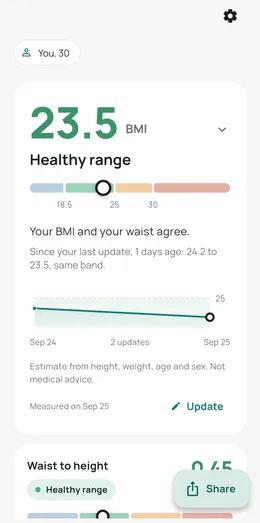
Your body mass index against the WHO cut points, with the band you fall in and how far you are from the next one. The app says plainly that BMI compares weight with height and cannot tell muscle from fat.
It also shows Trefethen's 2013 exponent 2.5 version as a footnote, because the standard formula reads slightly high for tall people and slightly low for short people. No health service has adopted cut points for it, so it stays a footnote rather than a verdict.
The app never assumes your ancestry
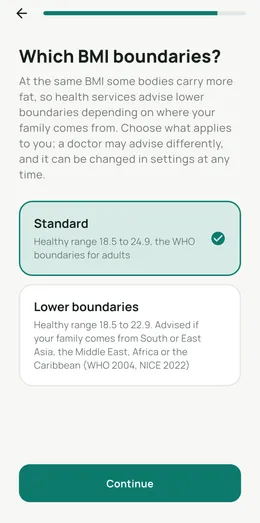
At the same BMI, some bodies carry more fat. Health services in several countries advise lower boundaries for people of South and East Asian descent, so the app offers them: a healthy range of 18.5 to 22.9 instead of 18.5 to 24.9.
It is a choice you make, not an assumption the app makes about you.
Body fat, three ways
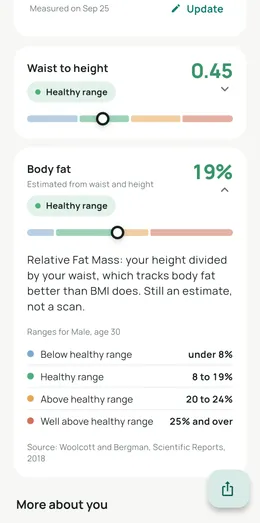
With just your height, weight, age and sex, the app estimates body fat with the Deurenberg equation. Add a waist measurement and it uses Relative Fat Mass, which tracks body fat more closely. Add a neck and hip measurement too and it uses the US Navy circumference method.
Whichever it used, it tells you which one, explains what the method is, and shows the healthy range for your sex and age from Gallagher's cut points. Relative Fat Mass comes from Woolcott and Bergman, published in Scientific Reports in 2018; the Navy method is the US Navy's own circumference standard.
Where the weight sits
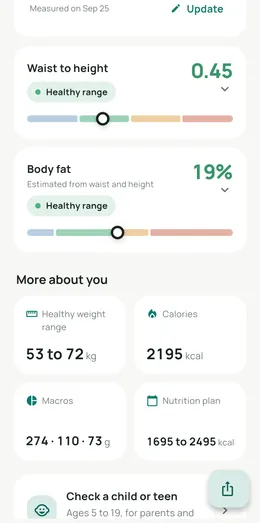
A tape measure round your waist tells you something BMI never can. The app works out your waist to height ratio, where under 0.5 is the usual guide, and the Body Roundness Index, which is a different way of reading the same two measurements.
When your BMI and your waist disagree, it says so on the home screen rather than leaving you to notice.
Calories and macros, with no crash option
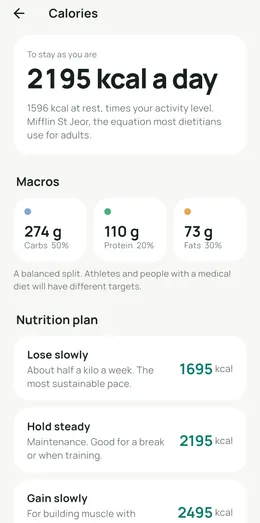
Your resting metabolic rate from the Mifflin St Jeor equation, multiplied by your activity level to give total daily energy. Then a macro split in grams, and three plans: lose slowly, hold steady, or gain slowly.
Lose slowly means about half a kilo a week, which is the pace most people can actually keep. There is no crash option, on purpose.
The app does not count what you eat. It tells you the target; a food tracker is a different job.
Children and teenagers, done properly
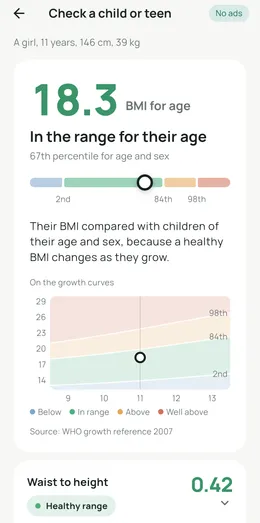
Adult BMI cut points do not apply to a growing child. For ages 5 to 19 the app reads BMI for age against the WHO 2007 growth reference, using the child's exact age in months and their sex, and gives a percentile with the growth curves drawn out.
This is the part most BMI apps get wrong, and it is the part parents actually need.
The part most BMI apps get wrong
Children aged 5 to 19 read against the WHO 2007 growth curves for their exact age and sex, never adult cut points. Free, like everything else in the app.


Free, no account, and it works offline. 100,000+ downloads on Google Play.
More than one person, and more than one day
The app keeps everyone on the phone in their own profile, adults and children, and remembers past readings so it can tell you what changed since last time. The wording stays neutral: changed, moved, same band. Never lost, never a target.
If you want charts and photographs over months rather than a comparison with last time, that is what Body Diary is for. Thecomparison page explains the difference.
Free, no account, and it works offline. 100,000+ downloads on Google Play.
This is not medical advice. Body Numbers is a calculator. It does not diagnose, treat or monitor any condition, and no number it produces should replace a conversation with a doctor or a dietitian. If a result worries you, or if you are pregnant, unwell, or under eighteen, speak to a health professional.
